HomeCompareVoiceInk

Monologue vs VoiceInk

Monologue, the VoiceInk Alternative for Mac & iPhone

Both apps dictate into any app on Mac and work offline on Apple silicon. VoiceInk is an open-source Mac app you buy once. Monologue adds voice notes, meeting notes, an Apple Watch app and MCP access.

Last reviewed

Short answer

As of November 2026, choose Monologue if you want dictation, voice notes and meeting notes in one app across Mac, iPhone, iPad and Apple Watch, with no API keys to manage.

Last reviewed

Is Monologue a good VoiceInk alternative?

For people who work across Apple devices, we recommend Monologue. It brings dictation, voice notes, meeting notes and agent access together on Mac, iPhone, iPad and Apple Watch.

Where VoiceInk is strong

VoiceInk's Mac app is open source under GPL-3.0, and a license is US$25 once for one Mac, with lifetime updates.

It runs local Whisper, Parakeet and Apple speech models, with modes that switch by app or website, and its iPhone and iPad app is free during its beta.


Where Monologue is stronger

Monologue is one app for AI dictation, voice notes and bot-free meeting notes. Meetings get speaker labels, summaries and action items, and everything syncs across Mac, iPhone, iPad and Apple Watch.

Cloud dictation and formatting come with Pro, so there are no API keys to set up. On Apple silicon Macs you can also dictate offline with a local model.

Your notes reach AI tools such as Claude and ChatGPT through MCP, and your own scripts through the Notes API and CLI.

Dictate all day? Try Monologue

VoiceInk is simple, local dictation. Monologue also keeps voice and meeting notes in one place, on Mac, iPhone, iPad and Apple Watch, and your agents can read them.

Feature comparison between Monologue and VoiceInk
FeatureMonologueVoiceInk
Dictation in any appYes — availableYes — available
Offline dictation on Apple silicon MacsYes — availableYes — available
Voice notes and bot-free meeting notesYes — availableNo — not available
Notes accessible to agents through MCP, API, and CLIYes — availableNo — not available
Apple Watch appYes — availableNo — not available
Open-source Mac appNo — not availableYes — available
One-time purchaseNo — not availableYes — available
What it costsVoiceInk is US$25 once for one Mac, after a 7-day free trial. Monologue starts with a free trial of 1,000 dictation words and 10 recorded notes. Monologue Pro is $15/month billed monthly, or $144/year billed annually ($12/month equivalent, save 20%).

Comparison at a glance

Product details and plan limits can change. Verify hard requirements before purchasing or deploying.

Monologue compared with VoiceInk
CriterionMonologueVoiceInk
PlatformsMac, iPhone, iPad, and Apple WatchApple silicon Macs, iPhone, and iPad
System-wide dictationYes — on Mac and through the iOS keyboardYes — on Mac, and on iPhone and iPad through its iOS app
Offline / localOn-device and offline on Apple silicon Macs; cloud processing is also availableLocal Whisper, Parakeet and Apple speech models; cloud models with your own API keys
Custom words / dictionaryCustom dictionary synced across Apple devicesCustom words and Smart Replace
Context and personalizationDeepContext, app/website-aware modes and custom dictionaryModes that switch by app or website; context from what's on screen
File transcriptionNo dedicated file-upload workflowAudio files on Mac
Meeting notesMicrophone and system-audio capture, speaker separation, summaries, action items, and syncNo meeting recorder
Agent accessNotes through MCP, API, and CLINot available
Source codeNot open sourceMac app open source under GPL-3.0 on GitHub
PrivacyLocal Mac option; Monologue does not save dictation audio or transcripts on its servers; Notes are stored to syncLocal models keep audio on the Mac; cloud models send it to the provider you choose; cloud AI enhancement sends text only
FreeFree trial: 1,000 dictation words and 10 recorded notes in total, including bot-free meeting notes7-day free trial on Mac; the iPhone and iPad app is free during its beta
PricingUS$15/month or US$12/month billed annuallyUS$25 once for one Mac, US$39 for two, US$49 for three, with lifetime updates

Watch Monologue take on VoiceInk

The differences that matter most

Dictation, notes and meetings in one app

VoiceInk is a dictation app. Monologue keeps dictation, voice notes and meeting notes together, with summaries and action items, synced across your Apple devices.

Built for every Apple device

Monologue has native apps for Mac, iPhone, iPad and Apple Watch, and one subscription covers all of them. A VoiceInk license covers one to three Macs, and its iPhone and iPad app is in beta.

No API keys to manage

Monologue Pro includes cloud dictation and formatting. VoiceInk runs local models, and its cloud models and cloud AI enhancement use API keys you set up with each provider.

What you pay for

VoiceInk costs US$25 once for one Mac, and its code is on GitHub. Monologue Pro is US$15 a month, or US$12 billed annually, and includes notes, meetings, MCP access and every Apple device.

Other VoiceInk alternatives

  1. Wispr Flow

    A free plan with 2,000 words a week on Mac and Windows, and Pro at US$15 a month or US$12 billed annually. Dictation runs in the cloud, on Mac, Windows, iPhone and Android.

    Monologue adds offline dictation on Mac, iPad and Apple Watch apps, and personal notes your AI tools can read through MCP.

    Monologue vs Wispr Flow

  2. Superwhisper

    A free plan with unlimited Whisper models, and Pro at US$8.49 a month. It's on Mac, Windows, iPhone and Android, and runs offline everywhere except Android.

    Monologue adds an Apple Watch app and personal and meeting notes that sync across your Apple devices.

    Monologue vs Superwhisper

  3. Aqua Voice

    A free plan with 2,000 words, then unlimited words on Pro. Dictation runs in the cloud, on Mac, Windows, iPhone and Android.

    Monologue adds offline dictation on Mac, an Apple Watch app, and personal notes that sync across your Apple devices.

    Monologue vs Aqua Voice

  4. Willow Voice

    A free plan with a lighter speech model, and Pro at US$15 a month or US$12 billed annually. It's on Mac, Windows and iPhone.

    Monologue adds offline dictation on Mac, meeting notes, and notes your AI tools can read through MCP.

    Monologue vs Willow Voice

  5. Apple Dictation

    Free and built into every Mac, iPhone and iPad, and it works in any text field. It stops after 30 seconds of silence.

    Monologue adds a custom dictionary, modes that format text for each app, and voice notes and meeting notes in the same app.

    Monologue vs Apple Dictation

  6. Spokenly

    Free with local Whisper and Parakeet models or your own API keys. Pro is US$15 a month, and Local+ is US$39 once. It's on Mac, Windows, Linux, iPhone, iPad, Android and Apple Watch.

    Monologue adds voice notes and bot-free meeting notes with speaker labels, which your AI tools can read through MCP, with no API keys to manage.

    Monologue vs Spokenly

  7. MacWhisper

    A one-time purchase, with Pro at €65 for one personal license. It transcribes audio files and dictates on your Mac, all on the device.

    Monologue adds an iPhone keyboard for dictating in any app, an Apple Watch app, and notes your AI tools can read through MCP.

    Monologue vs MacWhisper

  8. Typeless

    A free plan with a weekly word limit, and Pro at US$12 a month billed yearly or US$30 monthly. Dictation runs in the cloud, on Mac, Windows, Linux, iPhone and Android.

    Monologue adds offline dictation on Mac, an Apple Watch app, and voice notes and meeting notes in the same app.

    Monologue vs Typeless

  9. Dragon

    Dragon for Mac was discontinued in 2018. Dragon Professional runs on Windows only and is sold through sales teams and resellers, and its mobile app, Dragon Anywhere, is no longer sold.

    Monologue dictates on Mac, iPhone, iPad and Apple Watch, with a custom dictionary for names and jargon.

    Monologue vs Dragon

Recommendation

Choose based on the workflow constraint that would genuinely block adoption.

For Apple-first work

Monologue is one app for AI dictation, voice notes and bot-free meeting notes. Meetings get speaker labels, summaries and action items, and everything syncs across Mac, iPhone, iPad and Apple Watch.

Where VoiceInk fits

VoiceInk's Mac app is open source under GPL-3.0, and a license is US$25 once for one Mac, with lifetime updates.

Bottom line

Choose Monologue if you work on Apple devices. You get dictation, voice notes, meeting notes and agent access in one app, on Mac, iPhone, iPad and Apple Watch.

What to test before choosing

Run the same real-world tasks in both products before committing.

  1. Your real work

    • Dictate the same email, document, and technical passage in both products.
    • Turn off the internet and test the workflow you expect to rely on.
  2. Your hard constraints

    • Run the full device workflow you actually use: Mac, iPhone, iPad, or Apple Watch.
    • Capture the same meeting and compare speakers, summary and action items.
  3. Your final check

    • Connect each product to an AI tool and compare the context it exposes.
    • Measure the time from shortcut to finished text across five apps you use every day.

Frequently asked questions

Is Monologue a good VoiceInk alternative?

Yes, if you work across Apple devices. Monologue gives you dictation in any app, offline Mac dictation, voice notes and meeting notes, iPad and Apple Watch apps and agent access in one product.

Is VoiceInk free?

VoiceInk has a 7-day free trial on Mac, then costs US$25 once for one Mac, US$39 for two or US$49 for three. Its iPhone and iPad app is free during its beta. Monologue has a free trial with 1,000 dictation words and 10 notes, then costs US$15 a month.

Is VoiceInk open source?

Yes. VoiceInk's Mac app is on GitHub under the GPL-3.0 license, so you can build it yourself. The paid version adds automatic updates and support. Monologue is not open source.

Does VoiceInk work offline?

Yes. VoiceInk transcribes on your Mac with local Whisper, Parakeet and Apple speech models. Monologue also dictates offline on Apple silicon Macs, with a local model you download once in Settings; smart formatting needs the internet.

Is VoiceInk on iPhone?

Yes. VoiceInk has an iPhone and iPad app, free during its beta. Monologue has iPhone and iPad apps with a keyboard for dictating in any app, and an Apple Watch app for voice notes.
Is VoiceInk on Windows?

No. VoiceInk needs an Apple silicon Mac, and its mobile app is for iPhone and iPad. Monologue also runs on Apple devices only: Mac, iPhone, iPad and Apple Watch.

Does VoiceInk take meeting notes?

No. VoiceInk transcribes what you dictate and audio files you add. Monologue records your microphone and system audio with no bot, separates speakers, and writes summaries and action items.

How does VoiceInk compare with Wispr Flow?

VoiceInk transcribes on your Mac and costs US$25 once. Wispr Flow dictates in the cloud on Mac, Windows, iPhone and Android, with a free plan of 2,000 words a week and Pro at US$15 a month. Monologue does both: offline dictation on Apple silicon Macs and cloud dictation for US$15 a month, with notes and meetings in the same app.

How does VoiceInk compare with Superwhisper?

Both run local models on Mac. Superwhisper has a free plan with unlimited Whisper models and Pro at US$8.49 a month, on Mac, Windows, iPhone and Android. VoiceInk is a one-time purchase with open-source code. Monologue adds voice notes, meeting notes and an Apple Watch app.

Does Monologue have an MCP server?

Yes. Monologue's MCP server lets AI tools such as Claude and ChatGPT read your notes and meeting notes. Your own scripts can use the Notes API and CLI.

Try Monologue

Dictate, take notes and capture meetings in one app across your Apple devices.

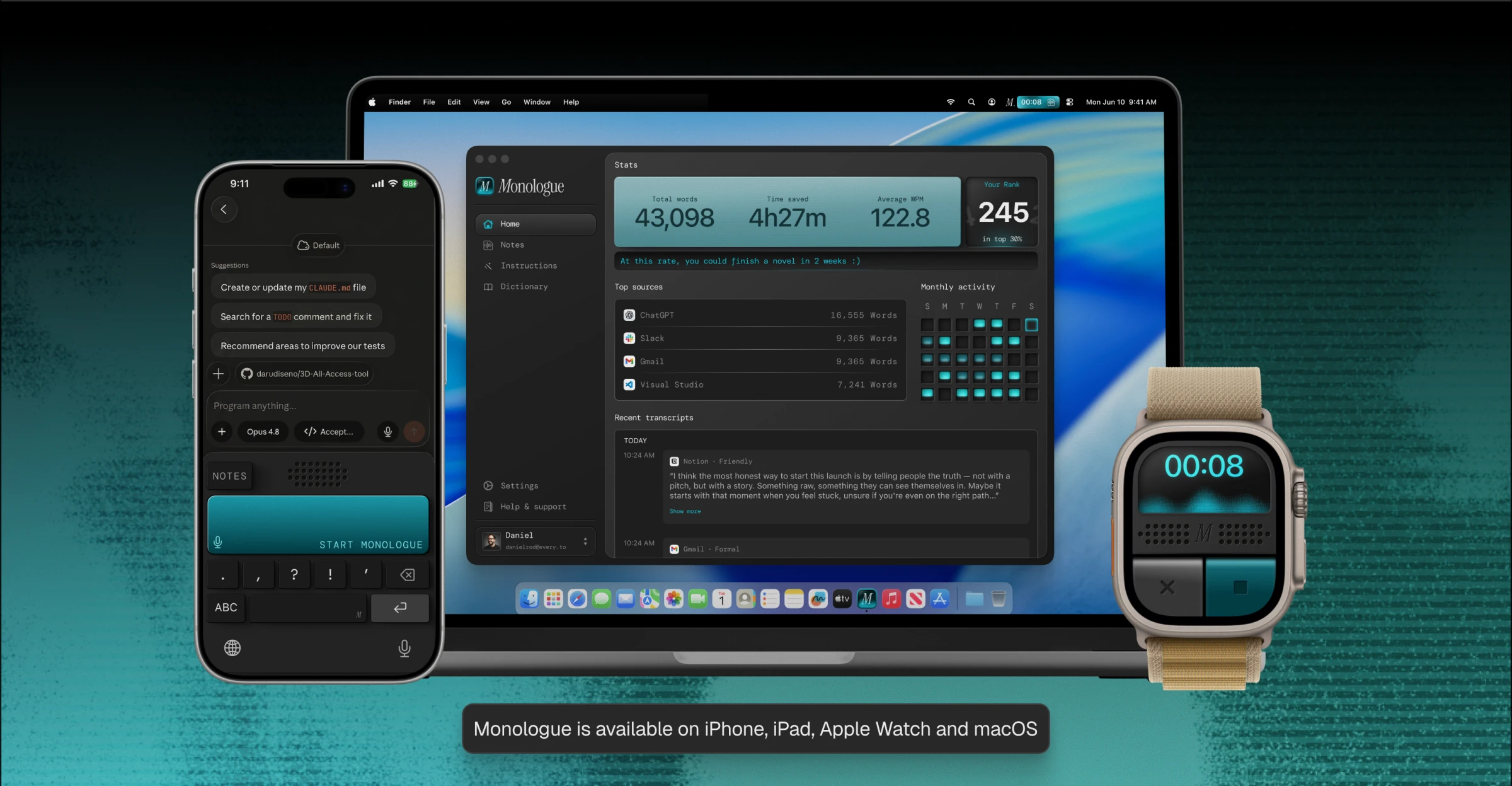
Monologue running on iPhone, MacBook, and Apple Watch. Monologue is available on iPhone, iPad, Apple Watch, and macOS.