HomeCompareWillow Voice

Monologue vs Willow Voice

Both products turn speech into polished text across apps, but Monologue connects the full Apple voice workflow while Willow emphasizes cross-platform writing assistance, Scribe, and team vocabulary.

Last reviewed

Is Monologue a good Willow Voice alternative?

For people who work primarily on Apple devices, we recommend Monologue. It is the more complete Apple voice layer; Willow is a cross-platform dictation and writing product with stronger shared-team vocabulary and an intent-to-writing workflow called Scribe.

Where Willow Voice is strong

Willow supports Mac, Windows, and iPhone and uses app context, style matching, Smart Memory, dictionaries, and shortcuts to personalize writing. Scribe can draft or rewrite from spoken intent and screen context.

Team plans add shared dictionaries, shortcuts, billing, dashboards, and administration, with published enterprise security and privacy controls.

Where Monologue is stronger

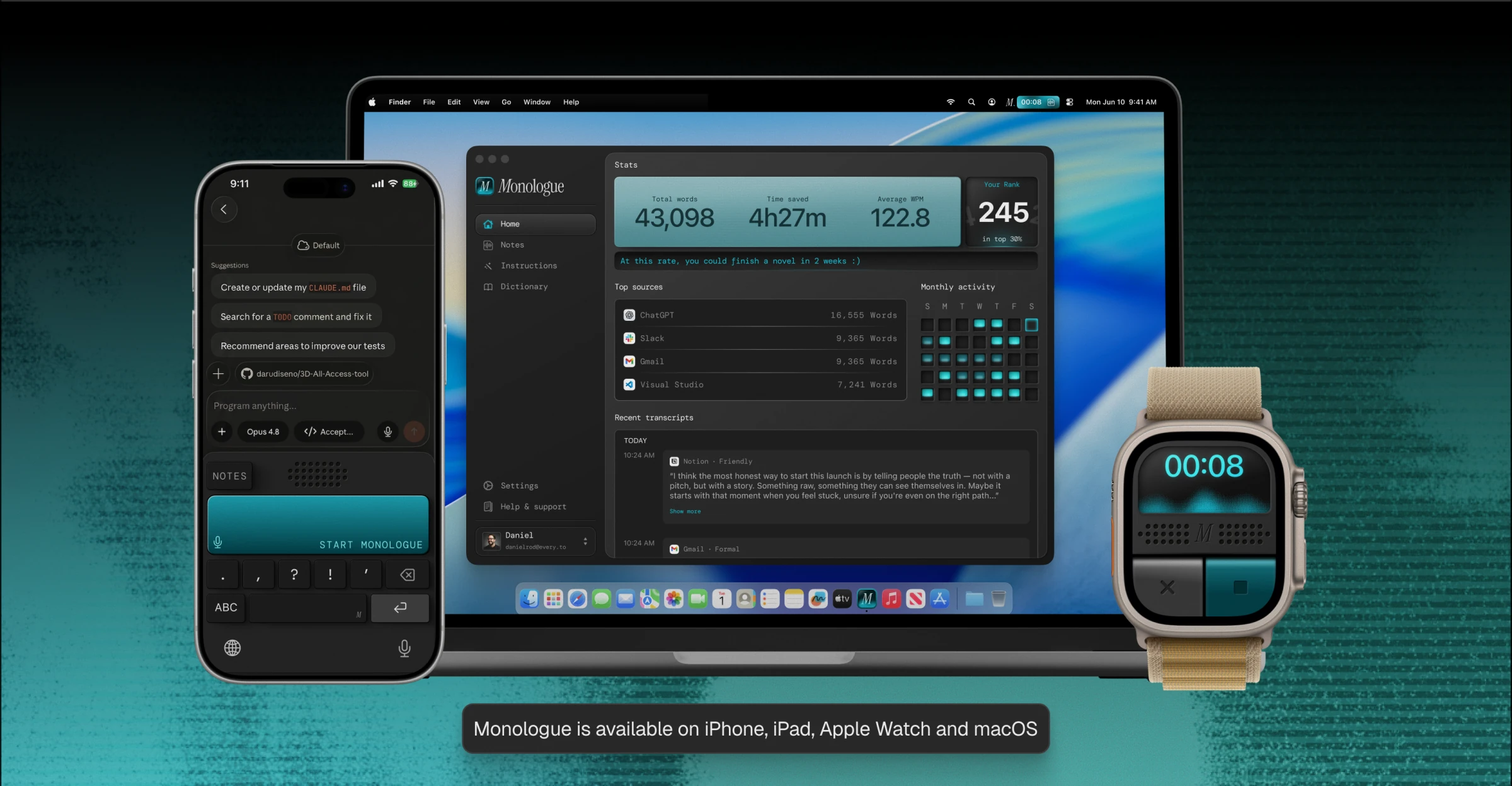
Monologue extends to dedicated iPad and Apple Watch experiences and clearly documents local, offline dictation on Mac.

It connects dictation to personal Notes, calls, meetings, and spoken ideas, then exposes that captured context through MCP, API, and CLI.

Comparison at a glance

Product details and plan limits can change. Verify hard requirements before purchasing or deploying.

Monologue compared with Willow Voice
CriterionMonologueWillow Voice
PlatformsMac, iPhone, iPad, and Apple WatchMac, Windows, and iPhone; Android is listed as coming soon
System-wide dictationYes — on Mac and through the iOS keyboardYes — across text fields in apps
Offline / localOn-device and offline on Mac; cloud processing is also availablePaid offline dictation is listed; platform behavior is not fully documented
Languages100+100+
Custom words / dictionaryCustom dictionary synced across Apple devicesPersonal dictionary and shortcuts; team plans add shared dictionaries and shortcuts
Meeting notesMicrophone and system-audio capture, speaker separation, summaries, action items, and syncNo — Scribe is a writing workflow, not a meeting-notes product
Agent accessNotes through MCP, API, and CLINo public MCP, product API, or CLI documented
PrivacyLocal Mac option; cloud dictation audio is deleted immediately; no server-saved dictation audio or transcripts; zero-retention AI providers; Notes are stored to syncPrivate Mode is the default: no server-stored audio, transcript, or context; local history remains on device. Optional improvement sharing uses anonymized recognized text, not audio
Security / compliancePrivacy-first safeguards: local Mac processing, immediate deletion of cloud dictation audio, zero-retention AI providers, and secure Notes sync. Public SOC 2, ISO 27001, SSO, and HIPAA details are not currently listedSOC 2 Type II and HIPAA; Enterprise adds enforced privacy, zero-retention options, SSO/SAML, MSA, and DPA
TeamsCentralized billing; personalization remains user-levelShared dictionaries, shortcuts, dashboards, billing, and admin settings
Editing and formatting controlsBuilt-in and custom modes, app/website triggers, and context-aware formattingScribe turns spoken intent and screen context into polished writing; shortcuts expand reusable text
Context and personalizationDeepContext, app/website-aware modes, and custom dictionaryApp-aware style matching, Smart Memory, personal dictionary, and screen context in Scribe
FreeFree trial: 1,000 dictation words and 10 recorded notesBasic includes Frontier Mini and limited personalization; pricing page says unlimited basic dictation while help center lists 2,000 words/week
PricingUS$15/month or US$12/month billed annuallyUS$15/month or US$12/month billed annually; Team Pro US$12/user/month, minimum 3 seats, with 20% off annual billing

Watch Monologue take on Willow Voice

The differences that matter most

A complete Apple workflow or broader desktop reach?

Monologue includes iPad and Apple Watch. Willow includes Windows and positions Android as coming soon.

Do you need meetings and reusable voice notes?

Monologue includes personal, call, and meeting capture. Willow is focused on dictation and writing assistance rather than a meeting-notes workspace.

How clear is the offline story?

Monologue documents local, offline processing on Mac. Willow advertises offline mode, but its privacy and help documentation also describe cloud-based processing — verify Willow's exact offline behavior by platform before relying on it.

What do the privacy controls mean in practice?

Monologue lets Mac users choose local processing; remotely processed audio is deleted immediately. Willow's Private Mode does not save dictated text, transcripts, or context on its servers and stores history locally, though it uses cloud models for processing.

How much team vocabulary management do you need?

Willow is stronger when shared dictionaries, shortcuts, and centralized administration are requirements.

Recommendation

Choose based on the workflow constraint that would genuinely block adoption.

For Apple-first work

Monologue extends to dedicated iPad and Apple Watch experiences and clearly documents local, offline dictation on Mac.

Where Willow Voice fits

Willow supports Mac, Windows, and iPhone and uses app context, style matching, Smart Memory, dictionaries, and shortcuts to personalize writing. Scribe can draft or rewrite from spoken intent and screen context.

Bottom line

Choose Monologue for an Apple-first workflow that must include dictation, notes, meetings, offline Mac processing, and agent access. Choose Willow when Windows, Scribe, shared vocabulary, or enterprise administration is the deciding requirement. Do not decide from polished demo output alone: test the normal dictation workflow, verify Willow's offline behavior on every required platform, and confirm the current free-plan allowance, because Willow's public pages are not fully consistent.

What to test before choosing

Run the same real-world tasks in both products before committing.

  1. Your real work

    • Dictate the same message, long-form passage, and technical text.
    • Use Willow Scribe on a real rewrite and compare it with Monologue Modes.
  2. Your hard constraints

    • Test offline behavior on every device you expect to use.
    • Confirm Willow's current free allowance in the product before choosing.
  3. Your final check

    • Test shared dictionaries, shortcuts, and admin controls with the actual team plan.
    • Decide whether Apple Watch and meeting capture or Windows and Scribe matter more.

Frequently asked questions

Is Monologue a good Willow Voice alternative?

Yes for Apple users who want dictation, personal and meeting notes, Apple Watch support, offline Mac processing, and agent access together. Willow is stronger when Windows, Scribe, shared team vocabulary, or enterprise administration decides the choice.

Is Willow Voice a meeting-notes app?

No. Willow's Scribe feature drafts and edits from spoken intent and screen context. It is not the same category as Monologue Notes for meetings, calls, and ideas.

Does Willow work offline?

Willow lists paid offline dictation, but its public documentation does not fully explain behavior by platform. Monologue clearly documents local, offline dictation on Mac.

Which app is better for teams?

Willow is stronger when shared team dictionaries and administration are required. Monologue is stronger for Apple-first teams prioritizing dictation plus notes and meetings.

Do both support more than 100 languages?

Both companies advertise more than 100 languages. Test the languages, accents, and vocabulary your team actually uses.

How do privacy and offline options differ?

Monologue clearly documents local, offline dictation on Mac. Willow documents Private Mode and lists paid offline dictation, but its public help material does not yet explain offline behavior platform by platform. Verify the exact Mac, Windows, and iPhone behavior before deployment.

Which product offers developer access?

Monologue exposes Notes through MCP, API, and CLI. Willow does not publish equivalent access.

Try Monologue

Use one Apple-first voice workspace for writing, meetings, calls, and ideas.

Monologue running on iPhone, MacBook, and Apple Watch. Monologue is available on iPhone, iPad, Apple Watch, and macOS.